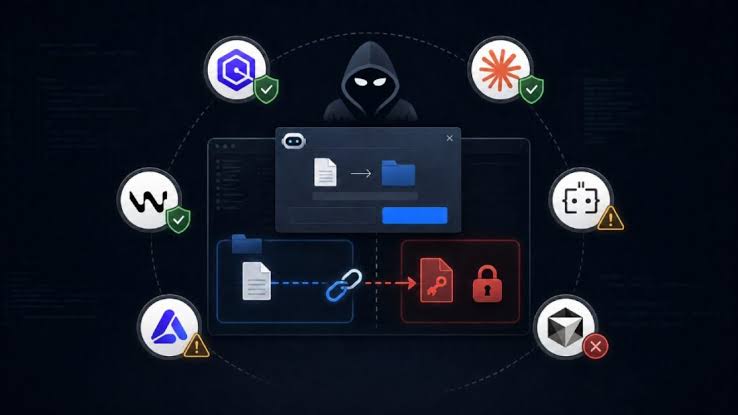
The rapid adoption of AI coding assistants—such as Cursor, Amazon Q, and Claude Code—has fundamentally changed software development workflows. By automating boilerplate code generation, debugging, and minor refactorings, these tools significantly boost developer velocity. However, this shift introduces novel security challenges.
A newly highlighted security vector, dubbed “GhostApproval,” underscores a critical vulnerability in how these tools handle execution boundaries. This threat maps closely to classic directory traversal and privilege escalation vulnerabilities, but with a modern, LLM-driven twist.
Understanding the “GhostApproval” Mechanism
AI coding assistants typically operate within a strict context window defined by the open workspace or project directory. Developers grant these tools permission to read, write, and execute scripts under the assumption that their operations are sandboxed or restricted to that specific scope.
The GhostApproval vulnerability exposes a blind spot in this boundary enforcement. It occurs when an assistant is tricked or naturally lapses into executing commands or accessing files outside the expected project directory.
How the Blind Spot Occurs
Context Drift & Path Manipulation: If a project contains symlinks, improperly sanitized path configurations, or nested configuration files (like
.cursorrules,.commands, or localized environment files), an attacker or a poorly formed codebase can inject indirect path references (e.g.,../../etc/shadowor traversing to root SSH keys).Implicit Execution (The “Ghost” Element): Coding assistants often employ “agentic” workflows, meaning they can auto-approve a sequence of secondary actions once a developer grants initial permission for a primary task. If the assistant fails to validate that a secondary tool-call (like a terminal execution or file read) has strayed outside the project root, it grants implicit approval to read or modify sensitive global system files without alerting the user.
Impact on Leading AI Coding Tools
While specific implementation architectures differ, the core risk remains uniform across prominent tools:
Cursor: As an IDE fork, Cursor possesses deep integration with the local file system and terminal. If its path-validation logic relies heavily on front-end workspace boundaries rather than strict back-end sandboxing, structural traversal sequences can manipulate its file-indexing engine.
Amazon Q: When integrated into local environments or cloud IDEs, Amazon Q relies on contextual awareness to suggest edits. A GhostApproval vector could allow compromised project dependencies to trick the agent into pulling sensitive environment variables from parent directories during code analysis.
Claude Code: Operating primarily as a command-line agent, Claude Code can execute shell commands and modify codebases iteratively. If the boundary checks between the agent’s workspace and the host OS are bypassed, it could be leveraged to execute arbitrary code outside the targeted repository.
Risks and Consequences
If successfully exploited, the GhostApproval vulnerability can lead to severe operational security failures:
Exfiltration of Sensitive Data: Exposure of global configurations,
.envfiles belonging to other projects, private SSH keys, and local cloud credentials (~/.aws/credentials).Supply Chain Injections: An agent could unknowingly modify scripts or configuration files in a completely different directory on the developer’s machine, poisoning local builds or global package managers.
Privilege Escalation: By operating outside the project scope with the user’s terminal privileges, the assistant becomes an accidental vehicle for unauthorized system modifications.
Mitigation Strategies
Securing development environments against GhostApproval requires a shift from relying purely on LLM context constraints to implementing strict system-level guardrails.
1. Hard OS-Level Sandboxing
Do not rely on the AI assistant’s internal logic to respect directory boundaries. Run AI-integrated IDEs and CLI agents inside isolated environments, such as:
Docker Containers matching your development runtime.
Devcontainers to restrict the tool’s absolute root file system access.
Virtual Machines (VMs) or dedicated sandboxed profiles.
2. Principle of Least Privilege
Ensure that the shell or terminal instance spawned by the AI assistant does not execute with administrative or sudo privileges. Restrict its execution user to an isolated environment that only holds read/write permissions for the specific project folder.
3. Review Agentic Tool Calls
Maintain vigilance when utilizing “agent mode” features. If an assistant proposes an automated multi-step plan that involves running scripts or modifying files, carefully inspect the paths specified in the execution log before granting permission.
References
Note: As “GhostApproval” represents an emerging, highly specific threat model targeting modern AI agent boundaries, formal academic peer-reviewed literature specifically named after this variant is limited. Security practitioners analyze this threat through the lens of established LLM agentic vulnerabilities and secure sandbox design.
OWASP Foundation. (2025). OWASP Top 10 for Large Language Model Applications. (Specifically focusing on LLM01: Prompt Injection and LLM06: Sensitive Information Disclosure via indirect file access).
Anysphere (Cursor), AWS (Amazon Q), & Anthropic (Claude Code). Security & Privacy Documentation. (Refer to individual vendor documentation regarding workspace boundary enforcement and terminal execution sandboxing rules).
Micro-virtualization and Containerization Standards. Traditional access control mechanisms (such as Linux
chroot, namespaces, and cgroups) remain the primary defense vectors against directory traversal bugs in agentic developer tools.